
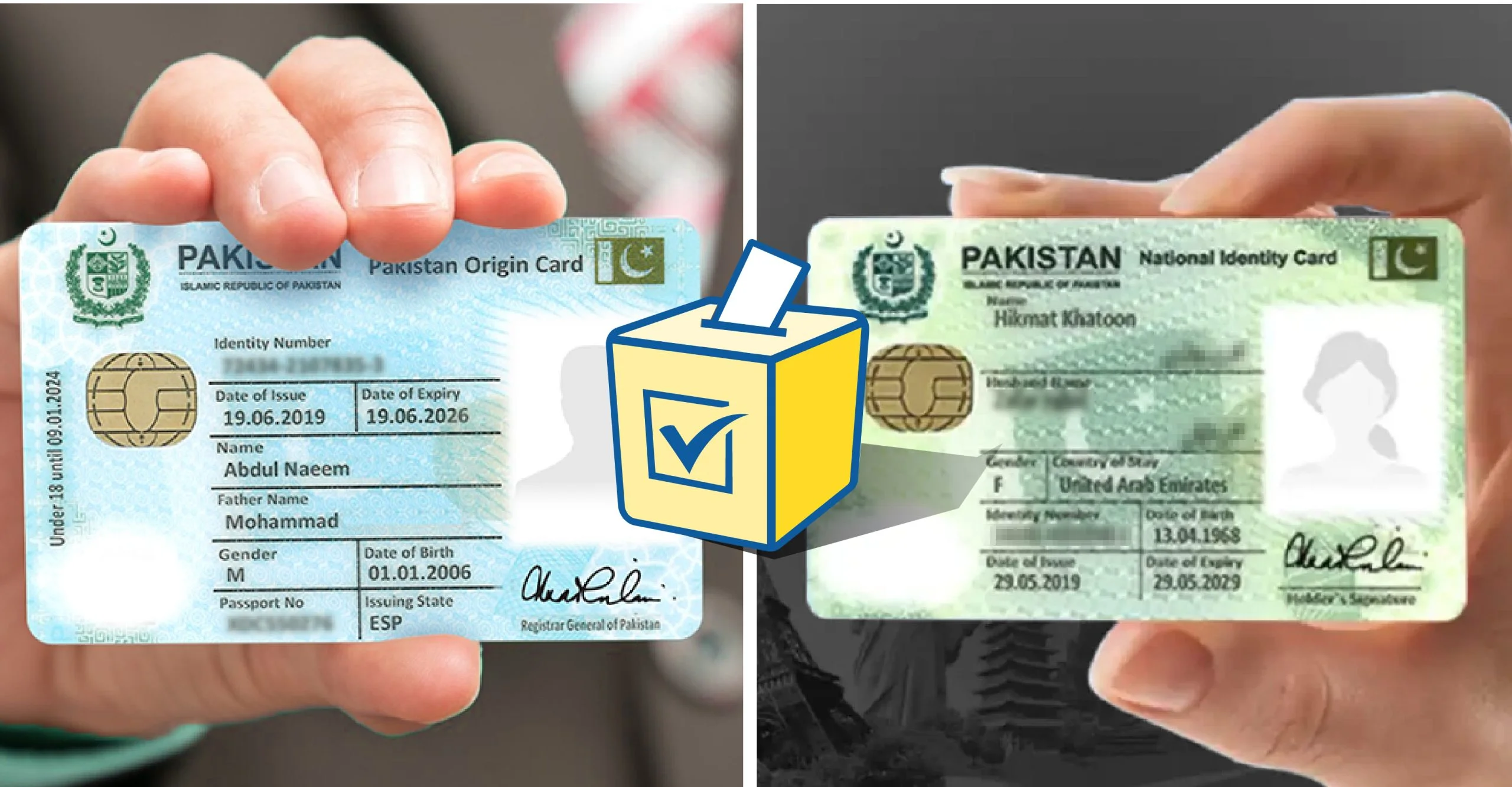
Millions of Pakistanis living abroad face the same frustrating situation every time they visit Pakistan or want to manage their Pakistani mobile numbers from overseas — confusion about whether their NICOP (National Identity Card for Overseas Pakistanis) works exactly like a CNIC for telecom purposes, or whether they need their original Pakistani CNIC for SIM registration and verification.
The confusion is understandable. NADRA issues both documents. Both carry a 13-digit identity number. Both are legally valid identity documents in Pakistan. But they serve different populations and have important differences that affect how you register and manage SIMs.
This is Pakistan’s most complete guide to NICOP vs CNIC for SIM registration in 2026 — written specifically for overseas Pakistanis who need clarity on exactly what their NICOP can and cannot do at Pakistani telecom franchises.
What Is NICOP and How Is It Different From CNIC?
NADRA issues two different identity cards for Pakistani nationals:
| Feature | CNIC | NICOP |
|---|---|---|
| Full name | Computerized National Identity Card | National Identity Card for Overseas Pakistanis |
| Who receives it | Pakistani residents | Pakistanis with foreign residency/citizenship |
| Color | Green | Blue |
| 13-digit number | Yes | Yes (different series) |
| Biometric data | Yes — fingerprints | Yes — fingerprints |
| Validity | 10 years | 5 years |
| Application | NADRA offices in Pakistan | Pakistani embassies, NADRA overseas centers |
| Primary use | Pakistan residents | Overseas Pakistanis visiting or managing Pakistan affairs |
| Dual nationality | Not for dual nationals | Specifically for dual nationals and overseas residents |
The critical point: both CNIC and NICOP are issued by NADRA and carry biometric data matched against NADRA’s central database. This means both documents can theoretically be used for biometric verification at telecom franchises.
Does NICOP Work for SIM Registration in Pakistan?
Yes — NICOP is officially accepted for SIM registration at Pakistani telecom franchises.
PTA’s regulations explicitly recognize NICOP as a valid identity document for SIM registration. All five operators — Jazz, Zong, Telenor, Ufone, and SCO — are required to accept NICOP for SIM registration from overseas Pakistanis.
However, the practical experience varies:
What Works Consistently
- NICOP is accepted at all major, official brand franchise locations — Jazz Experience Centers, Zong Service Centers, official Telenor Franchise stores, and Ufone Centers
- Biometric verification works with NICOP because NADRA’s fingerprint database covers all NICOP holders
- The 668 SMS service works with your NICOP’s 13-digit number just like a CNIC
What Sometimes Fails
- Smaller, third-party franchise locations and dealer shops sometimes refuse NICOP due to staff unfamiliarity — this is technically incorrect but happens
- If a franchise agent claims NICOP is not accepted, ask to speak with the franchise manager or call the operator’s helpline from the counter
- Online and app-based services occasionally still ask specifically for CNIC format — in these cases, use your NICOP number in the same 13-digit format
The definitive answer: NICOP legally works. If a franchise refuses it, they are not following PTA regulations. Escalate to the operator’s helpline immediately.
NICOP SIM Registration — Step-by-Step Procedure
When visiting Pakistan and wanting to register a SIM with NICOP:
Step 1: Visit an official, brand-owned franchise — not a street-level dealer. Major franchise locations have properly trained staff and are more likely to process NICOP without issues.
Step 2: Present your original NICOP — not a photocopy or digital image. The franchise agent must scan the physical card through the biometric terminal.
Step 3: Provide your valid passport as secondary identification. While not always mandatory, having your passport available alongside NICOP significantly reduces the chance of the agent refusing the registration.
Step 4: Complete biometric fingerprint verification — the process is identical to CNIC-based registration. Your thumb is placed on the biometric scanner, NADRA verifies your fingerprint against your NICOP record, PTA authorizes the SIM activation.
Step 5: Verify the registration within 24 hours. Send your NICOP’s 13-digit number to 668 via SMS. Confirm the new SIM appears under your identity.
How to Check SIM Details With NICOP From Abroad
One of the most valuable services for overseas Pakistanis is the ability to check and monitor all SIMs registered against their NICOP from anywhere in the world.
Method 1 — cnic.sims.pk Web Portal (Best for Overseas)
The official PTA portal at cnic.sims.pk works with NICOP numbers just like CNIC numbers.
- Visit cnic.sims.pk from any browser in any country
- Enter your 13-digit NICOP number — no dashes, no spaces
- Complete the CAPTCHA
- View all SIMs registered against your NICOP
This is the most reliable method for overseas Pakistanis since it requires no Pakistani SIM and works from any internet connection worldwide.
Method 2 — 668 SMS (Works When in Pakistan or With Pakistani SIM Abroad)
If you have a Pakistani SIM active on international roaming or are currently in Pakistan:
- Send your 13-digit NICOP number to 668
- Receive a reply showing all registered SIMs
Important: The 668 service may not work from international numbers. If you are abroad, use cnic.sims.pk instead. Full verification guide at Sim Owner Details — Pakistan’s most complete free SIM verification resource.
Method 3 — Operator Apps
If your Pakistani SIM is active (even on roaming), most operator apps (Jazz World, My Zong, My Telenor, My Ufone) allow you to manage your account from abroad. Log in with your Pakistani number and view registration details.
NICOP SIM Limits — Are They the Same as CNIC?
Yes. PTA applies the same SIM limits to NICOP as to CNIC:
| Limit | CNIC | NICOP |
|---|---|---|
| SIMs per operator | 5 | 5 |
| Total across all operators | 25 | 25 |
| Biometric required | Yes | Yes |
| DIRBS monitoring | Yes | Yes |
Your NICOP is treated identically to a CNIC for all PTA regulatory purposes. The same fraud risks apply — monitor your SIM count via cnic.sims.pk regularly.
What to Do If Unauthorized SIMs Are Found on Your NICOP From Abroad
Discovering unauthorized SIMs on your NICOP while you are overseas is a stressful situation but has a clear resolution path:
Option 1 — Authorize a Trusted Family Member in Pakistan
Write a Special Power of Attorney (SPA) authorizing a specific family member to handle the SIM disowning on your behalf. The SPA must:
- Be notarized by a Pakistani embassy or consulate in your country
- Specifically mention SIM disowning and NICOP identity protection
- Include your NICOP number, the family member’s CNIC number, and their full name
Your authorized representative takes the notarized SPA and their own CNIC to the operator franchise and requests SIM disowning in your name.
Option 2 — Contact PTA Directly From Abroad
Email PTA at complaints@pta.gov.pk with:
- Your NICOP number
- A scan of your NICOP
- Screenshot of cnic.sims.pk showing unauthorized SIMs
- A written complaint requesting immediate investigation
PTA typically responds to overseas NICOP holder complaints within 3–7 working days.
Option 3 — Wait Until Your Next Visit to Pakistan
If the unauthorized SIMs are not being used for active fraud (no JazzCash transactions, no criminal activity), you can document the evidence now and handle the in-person disowning at your next Pakistan visit. Continue monitoring via cnic.sims.pk monthly until then.
For the complete unauthorized SIM blocking procedure, visit the SIM information page.
NICOP Renewal — Key Differences From CNIC Renewal
Since NICOP is valid for only 5 years (vs CNIC’s 10 years), overseas Pakistanis face renewal needs more frequently:
| Step | NICOP Renewal | CNIC Renewal |
|---|---|---|
| Where to apply | Pakistani embassy/consulate OR NADRA overseas center OR Pakistan visit | NADRA office in Pakistan |
| Processing time | 4–8 weeks (from abroad) | 15–30 working days |
| Fee | Varies by country (USD 20–50 equivalent) | Rs. 750 standard |
| Biometric update | Required | Required |
| Validity after renewal | 5 years | 10 years |
When NICOP expires: All the same SIM consequences apply as with an expired CNIC — you cannot register new SIMs and existing SIMs may face re-verification requirements. Begin the NICOP renewal process at least 4 months before expiry to account for international processing delays.
NICOP vs CNIC — Quick Decision Guide for Overseas Pakistanis
| Your Situation | Which Document to Use |
|---|---|
| Living abroad, visiting Pakistan briefly | NICOP — it is specifically designed for you |
| Returned to Pakistan permanently | Apply for CNIC conversion at NADRA |
| Have both NICOP and old CNIC | Use whichever is currently valid |
| NICOP expired, CNIC also expired | Renew NICOP at embassy immediately |
| Franchise refusing NICOP | Insist — NICOP is legally valid. Call operator helpline from the counter |
| Checking SIMs from abroad | Use cnic.sims.pk with your NICOP number |
Frequently Asked Questions
Q: Can I use NICOP to register a SIM in Pakistan?
A: Yes. NICOP is officially accepted by all Pakistani telecom operators for SIM registration. If a franchise refuses, they are not following PTA regulations. Escalate to the operator helpline.
Q: Is NICOP number format the same as CNIC for the 668 SMS service?
A: Yes. Both CNIC and NICOP use 13-digit numbers. Enter your NICOP number in the same way you would enter a CNIC — 13 digits, no dashes — when using the 668 SMS service or cnic.sims.pk portal.
Q: Can overseas Pakistanis check their SIM details without coming to Pakistan?
A: Yes. Visit cnic.sims.pk from any browser anywhere in the world and enter your NICOP or CNIC number. All registered SIMs will be displayed.
Q: What if both my NICOP and my old CNIC are expired?
A: Renew your NICOP at your nearest Pakistani embassy or NADRA overseas center immediately. Until renewal, you cannot register new SIMs. Existing SIMs remain active during a grace period.
Q: Does a Pakistani embassy in my country handle NICOP for SIM registration purposes?
A: Pakistani embassies issue and renew NICOP but do not handle telecom franchise services. Use your NICOP at any authorized franchise in Pakistan for SIM registration.
For complete guidance on Pakistan SIM database verification and Pak SIM data checking using your NICOP number, all official tools are available free at Sim Owner Details.
 SIM OWNER DETAILS
4 thoughts on “NICOP vs CNIC — Which One to Use for SIM Registration Overseas Pakistanis 2026”