
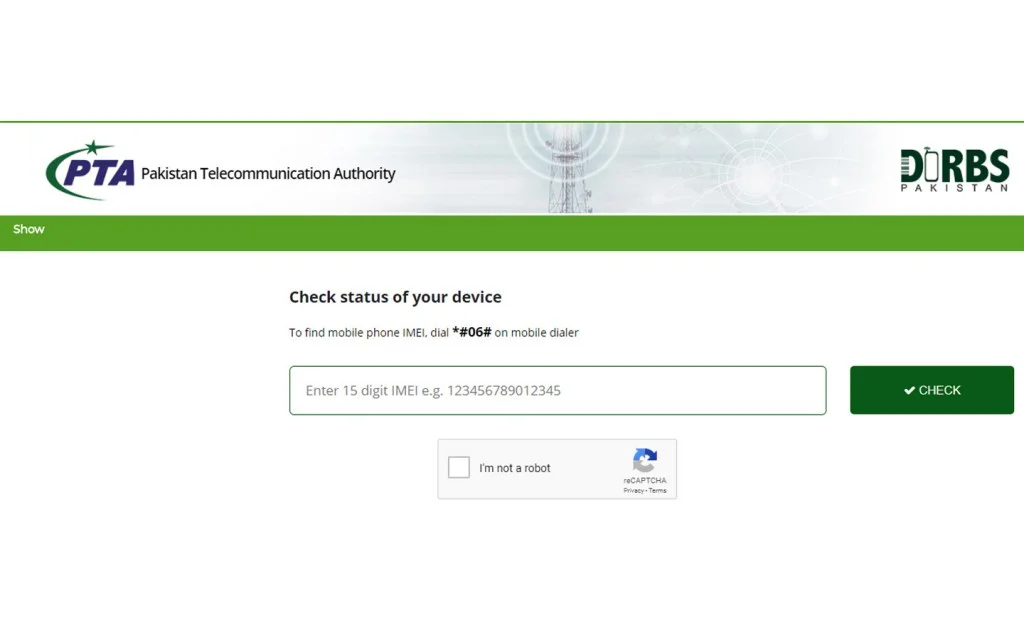
Every mobile device operating on a Pakistani network in 2026 is monitored, tracked, and verified by a single government system — DIRBS. The Device Identification Registration and Blocking System is PTA’s most powerful regulatory tool, and yet the majority of Pakistani mobile users have never heard of it, do not know what it does, and have no idea that their phone’s ability to make calls depends entirely on this system approving their device.
When your phone suddenly shows “No Service” or “SIM Not Supported” without any obvious reason, DIRBS is almost certainly the cause. When you buy a phone from abroad and it stops working after a few weeks, DIRBS blocked it. When a stolen phone becomes permanently useless even with a new SIM, DIRBS did that too.
This is Pakistan’s most complete guide to understanding PTA’s DIRBS system — what it is, how it works, how to check your device status, and exactly what to do when DIRBS affects your phone or SIM.
What Is DIRBS? — The Complete Explanation
DIRBS stands for Device Identification Registration and Blocking System. It was developed by PTA in partnership with GSMA (the global mobile industry association) and officially launched in Pakistan in December 2018.
At its core, DIRBS does three things:
1. Identifies every mobile device operating on Pakistani networks using the device’s IMEI number — a unique 15-digit identifier assigned to every mobile phone at the factory.
2. Registers legitimate devices — phones purchased through official channels with valid IMEI numbers assigned by GSMA are registered as compliant.
3. Blocks non-compliant devices — phones with duplicate IMEIs, invalid IMEIs, phones brought into Pakistan without proper registration, and phones reported stolen are blocked from connecting to Pakistani networks.
Before DIRBS, Pakistan’s mobile market was flooded with counterfeit phones, smuggled phones with fake IMEIs, and stolen devices. PTA’s data showed that millions of phones operating on Pakistani networks had duplicate or invalid IMEI numbers — the same IMEI on multiple devices — which made tracking stolen phones impossible and allowed counterfeit manufacturers to operate freely.
DIRBS changed everything. Within two years of implementation, it had identified and blocked over 2.5 million non-compliant devices and forced the formalization of Pakistan’s mobile phone import market.
How DIRBS Works — The Technical Process Explained Simply
Step 1 — IMEI Check at Network Registration
Every time a SIM card is inserted into a phone and the phone connects to a Pakistani mobile network, the network automatically reads the phone’s IMEI number and sends it to DIRBS for verification.
Your IMEI: Find it by dialing *#06# on any phone. A 15-digit number appears — this is your IMEI. Write it down and keep it safe.
Step 2 — DIRBS Classification
DIRBS classifies every IMEI into one of four categories:
| Classification | Meaning | Network Access |
|---|---|---|
| Compliant | Valid IMEI, legally imported or manufactured | Full network access |
| Non-compliant | Invalid, duplicate, or unregistered IMEI | Blocked or restricted |
| Stolen/Lost | Reported by owner as stolen or lost | Blocked completely |
| Provisional | Imported device in registration grace period | Temporary access |
Step 3 — Action Based on Classification
- Compliant devices: Full network access. No restrictions.
- Non-compliant devices: Progressive blocking. First data is restricted, then SMS, then calls. Complete block within 60–120 days of detection.
- Stolen/lost devices: Immediate complete blocking across all networks simultaneously.
- Provisional devices: Full access during the 60-day registration window. Blocked if not registered within the window.
For PTA Helpline 0800-55055 — What to Report and How to File Complaint Pakistan 2026
How to Check Your Phone’s DIRBS Status
Every Pakistani mobile user should check their device’s DIRBS status — especially before buying a second-hand phone or a phone brought from abroad.
Method 1 — DIRBS Official Website
- Visit dirbs.pta.gov.pk
- Click “Device Verification”
- Enter your 15-digit IMEI number (dial *#06# to find it)
- Complete the CAPTCHA
- Receive instant status — Compliant, Non-compliant, Stolen, or Provisional
This check is completely free and takes under 30 seconds.
Method 2 — SMS to 8484
- Open SMS app
- Type your 15-digit IMEI number
- Send to 8484
- Receive status reply within 60 seconds
Cost: Small SMS charge may apply. Works 24/7 on all networks.
Method 3 — PTA Official App
PTA’s official DIRBS app is available on Google Play Store. Download, enter IMEI, receive instant status with additional device details.
For complete SIM and device verification guidance, visit Sim Owner Details — Pakistan’s most complete free verification platform.
How to Register an Imported Phone in Pakistan — Complete Procedure
If you bring a phone from abroad or received one as a gift from overseas, you must register it with PTA within 60 days of arrival in Pakistan to avoid DIRBS blocking.
Personal Import Registration (Up to 5 Devices Per Year)
Step 1: Find your phone’s IMEI by dialing *#06#
Step 2: Visit dirbs.pta.gov.pk → Click “Device Registration” → Select “Overseas/Traveler”
Step 3: Enter your CNIC or NICOP number, device IMEI, and device details (brand, model, purchase date)
Step 4: Pay the applicable registration duty — duty amount varies by phone value:
| Phone Value (USD) | Approximate Duty (PKR) |
|---|---|
| Under $100 | Rs. 0–2,000 |
| $100–$200 | Rs. 2,000–8,000 |
| $200–$350 | Rs. 8,000–15,000 |
| $350–$500 | Rs. 15,000–25,000 |
| Above $500 | Rs. 25,000–45,000+ |
Note: Duty rates are set by FBR and may change. Check current rates at dirbs.pta.gov.pk before payment.
Step 5: Pay duty through Jazz Cash, EasyPaisa, bank transfer, or debit/credit card
Step 6: Receive registration confirmation — your IMEI is now compliant in DIRBS
Step 7: Verify registration by sending IMEI to 8484 — should show “Compliant”
Airport Registration (For Arriving Travelers)
PTA and FBR have DIRBS registration kiosks at all major international airports in Pakistan:
- Islamabad International Airport (IATA: ISB)
- Lahore Allama Iqbal International Airport (IATA: LHE)
- Karachi Jinnah International Airport (IATA: KHI)
- Peshawar Bacha Khan International Airport (IATA: PEW)
Arriving travelers can register devices immediately at these kiosks before leaving the airport — avoiding any risk of the 60-day provisional period lapsing.
For CNIC Information Pakistan — Complete Identity Protection Guide 2026
DIRBS and Your SIM — The Critical Connection
DIRBS and your SIM registration are two separate systems but they interact in important ways:
A SIM in a non-compliant device still works temporarily — DIRBS gives a grace period before blocking. During this period, your SIM functions normally. After DIRBS blocks the device, the SIM itself is not blocked — it can be moved to a compliant device and will work immediately.
A compliant device with a blocked SIM — your phone works but cannot connect to the network. This is a SIM issue, not a DIRBS issue. Check your SIM status via the SIM information guide.
Stolen phone reporting: If your phone is stolen, report the IMEI to PTA at dirbs.pta.gov.pk → “Report Stolen Device.” PTA blocks the IMEI across all networks within 24 hours — making the stolen phone permanently useless for calls, data, and SIM operation. This is the most powerful anti-theft protection available in Pakistan.
What DIRBS Means for Second-Hand Phone Buyers
Buying a second-hand phone in Pakistan carries DIRBS risks that most buyers do not check. Before buying any used phone:
Check 1 — Verify IMEI before paying: Ask the seller to dial *#06# and show you the IMEI. Text it to 8484 or enter it at dirbs.pta.gov.pk before handing over any money. A non-compliant or stolen status means the phone will stop working on Pakistani networks — do not buy it.
Check 2 — Verify it is not reported stolen: A phone showing “Stolen” status in DIRBS is permanently blocked. No registration process can unblock it. This protects you from unknowingly buying stolen property.
Check 3 — Verify the IMEI matches: The IMEI shown when dialing *#06# should match the IMEI printed on the phone’s box, on the sticker under the battery (for removable battery phones), and in Settings → About Phone. If they do not match, the phone may have a fake IMEI — a major DIRBS violation.
Common DIRBS Problems and Solutions
Problem — Phone suddenly shows “No Service” after working fine
Cause: DIRBS has blocked the device for non-compliance. Usually happens 60–120 days after the device was first detected on the network.
Solution:
- Dial *#06# and note your IMEI
- Check status at dirbs.pta.gov.pk or SMS to 8484
- If “Non-compliant”: Register the device and pay applicable duty
- If “Stolen”: The device was reported stolen — if you are the legitimate owner, file a complaint at PTA with proof of purchase
Problem — New imported phone works then stops working
Cause: The 60-day provisional period expired without registration.
Solution: Register immediately at dirbs.pta.gov.pk. Pay the applicable duty. The device should become compliant within 24–48 hours of payment confirmation.
Problem — DIRBS website shows “Invalid IMEI”
Cause: Your phone has a fake or duplicated IMEI — common in very cheap counterfeit phones.
Solution: This is a serious issue. A fake IMEI cannot be legitimately registered. The phone cannot legally operate on Pakistani networks. Contact the seller immediately and request a refund.
Frequently Asked Questions
Q: What is an IMEI number and where do I find it? A: IMEI (International Mobile Equipment Identity) is a unique 15-digit number identifying every mobile device. Dial *#06# on any phone to display it instantly.
Q: How many phones can I bring from abroad without paying duty? A: PTA allows one mobile device per traveler per year duty-free (for personal use). Additional devices are subject to FBR import duty. Up to 5 devices per person per year can be registered in the personal import category.
Q: If my phone is blocked by DIRBS, does my SIM also get blocked? A: No. DIRBS blocks the device (IMEI), not the SIM. Remove your SIM and insert it into a compliant device — it will work immediately.
Q: Can a DIRBS-blocked phone be unblocked? A: Yes — for non-compliance blocks, paying the registration duty restores compliance. For stolen phone blocks, only the original owner can request removal by providing proof of recovery. Stolen blocks cannot be removed by anyone else.
Q: Does DIRBS affect Pakistani-purchased phones? A: Phones purchased from official retailers in Pakistan are automatically compliant in DIRBS — no additional registration needed. Only phones brought from abroad or bought from informal channels need verification.
For complete Pakistan SIM database verification and device compliance checking tools, all official resources are free at Sim Owner Details.
 SIM OWNER DETAILS
3 thoughts on “PTA DIRBS System Explained — How Device Blocking Works in Pakistan 2026”